Voice Transcription & Translation

Speak in many languages. Read in yours. AI-powered voice transcription with optional translation, currently using AI models from OpenAI and Google.

Speak naturally.
Get polished text.
Record a quick voice message: LOMA transcribes it with AI, translates it into many languages, and generates style variants so you can pick the perfect tone for any conversation.
micTap to record: AI does the rest
translateTranslation between many languages
auto_awesomeSmart variants: Professional, Friendly, Casual & more
content_copyCopy & paste into WhatsApp, Gmail, Slack
phone_androidAndroid languageWeb App extensionChrome
mic
Floating Bubble on Android
Record from any app: WhatsApp, email, browser. Tap the floating mic, speak, and the text is copied to the clipboard.
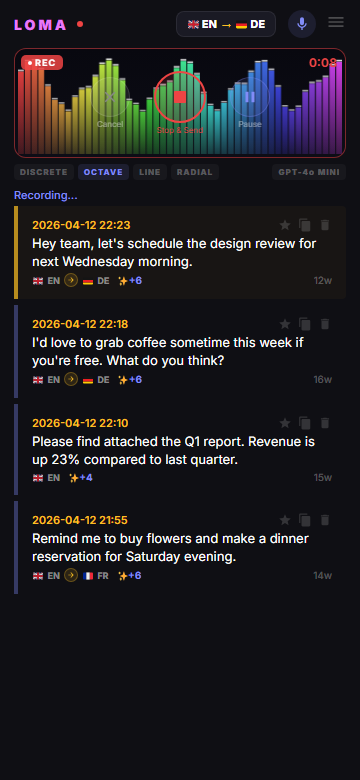
LOMA Android App: Voice to Text with AI Enhance, Recording, Translation, Smart Variants
mic
Voice Transcription
Record and transcribe speech in many languages with AI
translate
Built-in Translation
Transcribe and translate into many languages in one step
auto_awesome
AI Models
OpenAI GPT Transcribe, Google Gemini as fallback, more models in the web app
graphic_eq
Live Chunking
Optional: text appears in 10-second chunks while you speak
equalizer
4 Visualizer Modes
Discrete, Octave, Line, Radial spectrum display
share
Share & Export
Copy, share text, share audio (WAV), edit transcripts
language
Many languages
38
Variant styles
10s
Live Chunks
GPT Transcribe (OpenAI)
standard model
Gemini (Google)
automatic fallback
Whisper v3 Turbo
web app, own server
looks_one
Record your voice
Tap the mic button and speak naturally in one of many supported languages. LOMA captures your audio with a real-time visualizer.
looks_two
AI transcribes & translates
An AI model, currently OpenAI GPT Transcribe, converts speech to text. Optionally translate into many languages in one step.
looks_3
Smart Enhance generates variants
With Refine switched on, GPT-4o-mini corrects grammar and generates style variants: Professional, Friendly, Casual, Flirty, Concise, and more.
looks_4
Copy & paste anywhere
One tap to copy, then paste into WhatsApp, Gmail, Slack, LinkedIn or any other text field.
chat
Quick messaging
Dictate WhatsApp messages, emails, or Slack replies instead of typing. Get polished text in seconds.
work
Professional communication
Turn casual voice notes into professional emails. Choose from Formal, Professional, or Factual style variants.
public
Multilingual users
Speak in your native language, get text in another. Perfect for expats, travelers, and international teams.
edit_note
Voice notes & journaling
Capture thoughts on the go. LOMA transcribes your voice diary entries with AI-corrected grammar.
school
Language learning
Practice pronunciation: speak and see how AI interprets your speech. Compare translations side by side.
accessibility_new
Accessibility
Voice input for anyone who prefers speaking over typing. Works on Android, Web browser, and Chrome Extension.
Free
€0
No credit card required
  • check_circleMax per 1 recording30 sec
  • check_circleRecordings per day3
  • check_circleRecordings per month50
  • check_circleVariant stylesmax 3
  • check_circleTranscription modelGPT Transcribe
  • check_circleHistorylast 20
  • check_circleExport/Share audioyes
Plus
€7.99 / month
Currently not available
  • starMax per 1 recording1 min
  • starRecordings per day20
  • starRecordings per monthunlimited
  • starVariant stylesmax 5
  • starTranscription modelall models
  • starHistoryunlimited
  • starExport/Share audioyes
Pro
€19.99 / month
Currently not available
  • starMax per 1 recording2 min
  • starRecordings per day100
  • starRecordings per monthunlimited
  • starVariant stylesmax 10
  • starTranscription modelall models
  • starHistoryunlimited
  • starExport/Share audioyes

Plus and Pro cannot be purchased at the moment. Daily limits apply per account; when the overall daily capacity of the service is used up, transcription may pause until the next day. Plans, limits and prices may change.

Included in all plans
translate
Many languages: voice transcription & translation
Europe: Slavic: Slovak, Czech, Polish, Ukrainian, Russian, Bulgarian, Croatian, Serbian, Slovenian, Macedonian, Belarusian
Europe: Germanic: English, German, Dutch, Swedish, Norwegian, Danish, Icelandic
Europe: Romance: Spanish, Portuguese, French, Italian, Romanian, Catalan, Galician
Europe: Uralic & Baltic: Finnish, Estonian, Hungarian, Lithuanian, Latvian
Europe: Mediterranean: Greek, Maltese, Albanian
Middle East: Arabic, Hebrew, Persian (Farsi), Urdu
Turkic: Turkish, Azerbaijani, Kazakh, Uzbek
South Asia: Hindi, Bengali, Tamil, Telugu, Malayalam, Kannada, Marathi, Gujarati, Punjabi
East Asia: Japanese, Korean, Chinese (Mandarin)
Southeast Asia: Vietnamese, Thai, Indonesian, Malay, Filipino (Tagalog)
Africa: Swahili, Afrikaans, Amharic
auto_awesome
Smart Enhance: AI text correction & style variants
With Refine switched on, each recording is corrected for grammar, punctuation and spelling by GPT-4o-mini. Then LOMA generates alternative style variants (3 in the Free plan): each with a different tone, so you can pick the version that fits the situation. Corrected text and all variants are stored alongside the original transcription.
style
38 variant styles, including
business_centerWork & FormalProfessional · Formal · Factual
emoji_peopleCasual & FriendlyFriendly · Casual · Playful · Enthusiastic
local_fire_departmentDating & CharmingFlirty · Charming · Witty · Curious · Empathetic
favoriteRomanticHeartfelt & intimate tone
content_cutConciseShorter, tighter version
swap_horiz
Preview translation
When translating, each style variant includes a back-translation preview in your original language: so you can verify meaning without switching languages. Speak Slovak, get English variants, see Slovak previews.
devices
All platforms: one account everywhere
Use LOMA on Android (Google Play), Web browser (PWA at loma.sortia.de), and Chrome Extension. Sign in with the same Sortia account: your transcripts, translations, and variants sync across your devices.
content_copy
Copy, paste & share
One-tap copy any transcription, translation, or variant to clipboard. The Chrome Extension copies the result automatically, ready to paste into WhatsApp Web, Gmail, Slack, LinkedIn, Twitter or any other website. Share text or audio via Android share sheet.
graphic_eq
Audio visualizer
Real-time audio spectrum display with colorful frequency bars: see your voice as you speak. Discrete bar mode with rainbow hue gradient and peak indicators. Idle animation when not recording.
cloud_sync
Cloud sync & history
Your transcripts are stored in your account in the cloud (Supabase). Browse your transcription history (Free plan: last 20) with search, pagination, language flags, duration and word count. Access from any device.
lock
Account and sign-in
Sign in with email/password or Google Sign-In, using one Sortia account that also works in other Sortia apps such as Tempo and Tractor. Row Level Security (RLS) limits each account to its own data, and connections use HTTPS/TLS.
dark_mode
Dark and light theme
Dark interface with teal, indigo, and amber accents, plus a light theme in the settings of the Android and web app. Consistent design across Android, Web, and Chrome Extension.
speed
Usage at a glance
LOMA shows your plan, its limits and how much you have recorded today.
mic
AI transcription models
LOMA currently transcribes with OpenAI GPT Transcribe; if OpenAI is unavailable, Google Gemini takes over automatically. In the web app you can also choose Google Gemini or Whisper v3 Turbo on our own server, and the Plus and Pro plans add GPT-4o Transcribe and GPT-4o Mini Transcribe.
timer
Recording controls
Three-button camera-style recording interface: Cancel (discard), Stop & Send (transcribe), Pause/Resume. Real-time timer with REC badge. Auto-stop at plan limit. Floating bubble overlay on Android for recording from any app.